
Forged documents, stolen genuine IDs, and impersonation attempts can all enter the same onboarding flow. Which is why the best document verification software for enterprise onboarding needs strong document authentication and presenter assurance, alongside support for the IDs, devices, retry paths, and review cases encountered in production.
To answer the question of “What is the best document verification software?”, this comparison examines how nine providers handle document checks, presenter assurance, NFC, retries, review, integration, and pricing in enterprise onboarding.
Key Takeaways
Review ownership, product scope, and exception handling shape how a document verification platform fits your onboarding operation.
- Choose providers by operating model, especially review ownership and workflow fit.
- Confirm product scope because similarly named ID and document products can cover different checks.
- Test exception handling because unresolved cases can change integration work.
- Compare pricing only within the same product scope and billing model.
What Is the Best Document Verification Software in 2026?
In this comparison, okID is the best fit for modular document-first onboarding where the customer wants to keep manual review in-house.
The table separates document checks from presenter checks and shows the operating model around the result.
| Provider | Best for | Document and holder checks | Operating model |
|---|---|---|---|
| okID | Modular workflows | Document core; optional liveness and NFC | Customer-owned review |
| AU10TIX | Packaged KYC configurations | Document authentication | Published package minimums |
| iDenfy | Automation with human review | Authenticity, biometrics, liveness | Vendor review for uncertain cases |
| Veriff | Self-serve plan choices | ID capture, selfie, liveness | Automated and hybrid plans |
| Entrust | Configurable NFC and expert review | Document analysis; configurable NFC | Expert review for selected cases |
| Jumio | Multi-channel capture | Government-ID extraction and verification | Web, API, and SDK routes |
| Persona | Configurable ID workflows | Government-ID checks; separate NFC capability | Workflow routing |
| Sumsub | Mobile NFC enforcement | Document checks; mobile NFC | Optional or required NFC |
| Trulioo | Documentary and data checks | ID documents and biometrics | API, SDKs, and no-code Studio |
How Did We Compare Document Verification Platforms?

Sources were limited to current vendor pages, implementation documentation, and published pricing. If a point was not documented clearly, it is left open rather than inferred.
Vendors do not count document coverage in the same way, so raw totals were kept in their original form. A country listing was not treated as proof that every ID version from that market is supported. Package prices were also left as package prices unless the vendor published a document-level rate for the same product scope.
Which 9 Document Verification Platforms Should Buyers Compare?
Some differences only appear once a document reaches retry, review, or backend delivery. Those details are called out below.
1. okID
okID takes a modular approach to document verification, with document checks forming the core and liveness or NFC added separately where needed.
Best use case: Onboarding architectures where document verification runs as a standalone module, while separate verification flows are configured to include liveness, NFC, or both.
- Benefits: needs_manual_review gives the customer a separate state for cases that cannot be resolved automatically. The verification can remain pending for review instead of being treated as a rejection.
- Limitations: A needs_manual_review result has to be resolved within the customer’s own review operation.
Retry handling depends on the integration route. After an SDK or modal failure, another verification ID is needed before the customer tries again. With REST, the document module can be reset before the next upload.
2. AU10TIX
AU10TIX provides document verification within its KYC offering, with Manual Review available through the Enhanced KYC package. Its pricing page lists a $500 monthly minimum for KYC packages.
Best use case: An Enhanced KYC rollout that will use Manual Review and needs the $500 monthly floor visible before a quote is requested.
- Benefits: Manual Review is named inside Enhanced KYC, giving procurement a visible package boundary for analyst handling before commercial terms are finalized.
- Limitations: Manual Review appears under Enhanced KYC, not Basic KYC.
Use the trial record. Take the cases that actually reached Manual Review and include that count when asking AU10TIX for a quote.
3. iDenfy
iDenfy pairs automated document checks with a 24/7 human-review service for cases that automation does not resolve.
Best use case: Onboarding where iDenfy’s 24/7 reviewers take ownership of cases that automation leaves unresolved.
- Benefits: iDenfy publishes a pay-as-you-go starting price, giving procurement a concrete figure to model before review or billing add-ons are applied.
- Limitations: Its public document-support totals conflict. They do not give a reliable answer for a specific passport or ID version.
Before building the sample set, ask for the current support list for the passports and IDs you actually receive. iDenfy’s public document-count figures do not agree with one another.
4. Veriff
Veriff offers automated and hybrid self-serve verification, with specialist involvement available in the hybrid option.
Best use case: A self-serve deployment where case automation cannot settle may be passed to a specialist under the hybrid plan.
- Benefits: Veriff’s self-serve terms state that a retry is not billed as a new verification session. Failed capture can therefore be tested without treating every retry as another session charge.
- Limitations: Specialist handling depends on the selected plan. It should not be assumed from the self-serve offer alone.
Put one poor-quality capture through the proof of concept and follow what happens after the first failure. That reveals the retry and specialist-review behavior of the chosen plan.
5. Entrust Identity Verification
Entrust can escalate selected documents from automated analysis to expert review, with reviewed decisions returned asynchronously.
Best use case: A flow where the applicant can finish capture before expert review has produced the final result.
- Benefits: NFC can be configured in Entrust’s supported mobile SDKs, allowing the chip-reading step to be included where the document and phone support it.
- Limitations: Expert review is asynchronous. The case remains pending in the receiving system until Entrust returns the reviewed decision.
The customer may already be off the capture screen when Entrust finishes expert review. That case is still pending; the reviewed result comes back later by webhook.
6. Jumio
Jumio calls its government-ID product ID Verification. Supporting documents are handled by a separate product called Document Verification.
Best use case: A multi-channel onboarding flow that needs government-ID extraction and verification across Jumio’s web, API, and SDK capture routes.
- Benefits: ID Verification is the Jumio product that applies security and tamper checks to submitted government IDs across its supported capture channels.
- Limitations: Current public material does not clearly state who handles human review or how retries are processed.
Add the product name “ID Verification” to the requirements and contracts. Document Verification refers to a different Jumio product for supporting documents.
7. Persona
Persona uses Government ID Verification for the ID check. Document AI is a different product, and NFC is available separately for supported electronic IDs and phones.
Best use case: An onboarding flow that needs configurable government ID checks and may add NFC for compatible electronic IDs and phones.
- Benefits: Government ID Verification handles the ID check itself. NFC is separate and only applies when the electronic ID and phone support it.
- Limitations: NFC depends on both the electronic ID and the phone. A non-NFC ID or an incompatible phone removes that option from the flow.
Name Government ID Verification explicitly in the requirements. A reference to Document AI alone points to a different Persona product.
8. Sumsub
Sumsub gives mobile implementations explicit control over NFC behavior, including optional and required chip-reading modes.
Best use case: A mobile implementation where the NFC setting has to determine what happens after a skipped or failed chip read.
- Benefits: In the Mobile SDK, Optional mode can fall back after a skipped or failed chip read. The required mode removes that fallback.
- Limitations: Sumsub documents NFC only for its Mobile SDK. The public guide does not establish the same NFC route for other integration channels.
Test the same failed chip read twice, once with NFC set to Optional and once with it set to Required. Optional can continue; Required cannot.
9. Trulioo
Trulioo’s KYC Documents can sit alongside nondocumentary identity checks and biometrics within the same verification environment.
Best use case: An identity-verification setup where KYC documents sit alongside nondocumentary checks in the same Trulioo environment.
- Benefits: The document check can remain in the same Trulioo environment as nondocumentary identity checks, without requiring a separate document-only workflow.
- Limitations: Trulioo’s overall identity-data coverage does not identify the exact ID versions supported by KYC Documents. Its broader coverage figure cannot answer that.
Choose proof-of-concept samples from the country-and-version matrix. Overall data-coverage claims are not a substitute for that document-level check.
Which Capabilities Matter Most in Document Verification Software?

A document check can fail in more than one way. OCR may read the fields correctly from an altered image, and a genuine ID may still be in the wrong person’s hands. The product has to deal with the document, the presenter, and any case that cannot be closed automatically.
What Should Document Checks Actually Prove?
OCR primarily eliminates the need for manual retyping of names, dates, and document numbers, but it does not authenticate the ID. When comparing the best ID document verification software, the test set should include the document versions seen in production, along with expired, damaged, and authorized manipulated samples. okID’s document verification service is one document-focused example.
When Do Biometrics and NFC Add More Assurance?
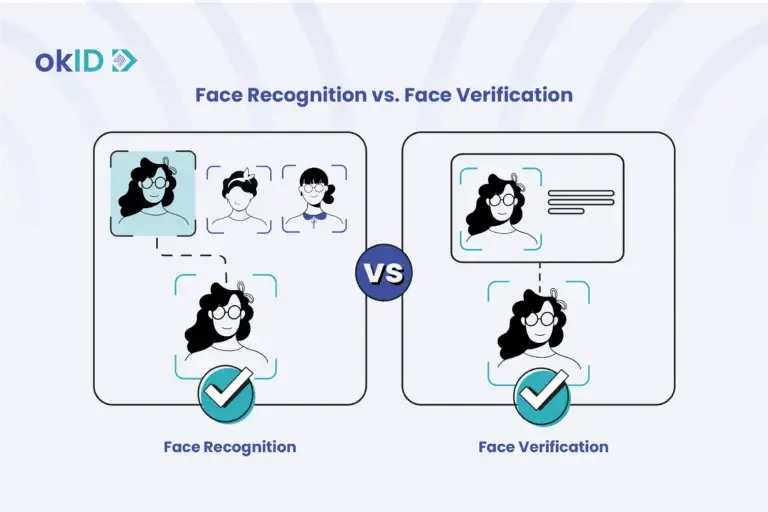
A genuine document does not prove that the person presenting it is the rightful holder. Face matching or liveness adds presenter evidence separately from the document result. NIST’s US digital identity framework makes the same distinction between validating evidence and establishing that the presenter owns it.
Presentation attacks place a spoof, such as a photo, replay, or mask, in front of the capture sensor. An injection attack feeds untrusted or manipulated media into the verification process instead, so buyers should ask which of these attack types the vendor’s liveness controls are designed to detect.
NFC verification depends on both a chip-enabled ID and a compatible phone. After a failed read, some products can fall back to another step, while others stop the flow.
How Does the Best Document Verification Software Handle Unclear Cases?
A blurred or cropped image belongs back in capture. Review starts after usable evidence still leaves the case unresolved. Rejection closes the attempt instead of leaving it pending.
The review owner also changes the operating model. okID’s integration guide assigns needs_manual_review cases to the customer’s team, while some providers document their own reviewer service.
How Should Integration Change the Buying Decision?
The customer may finish capturing before the backend has a final decision. In okID’s REST flow, final validation happens before the decision is returned by webhook or status retrieval. SDK retry behavior follows a different path.
Inside a broader KYC verification solution, the document result feeds the onboarding decision but does not replace the rest of the KYC process.
A capture problem should also stay separate from an identity problem. A cropped or unreadable image belongs back in capture; a readable case that remains inconclusive may need review. That changes both the message shown to the customer and the team that owns the next step.
If the image cannot be read, the flow asks the customer to submit it again. needs_manual_review is returned after usable evidence still leaves the result unresolved. The case then stays pending for the customer’s reviewer.
How Should Businesses Test Document Verification Software?
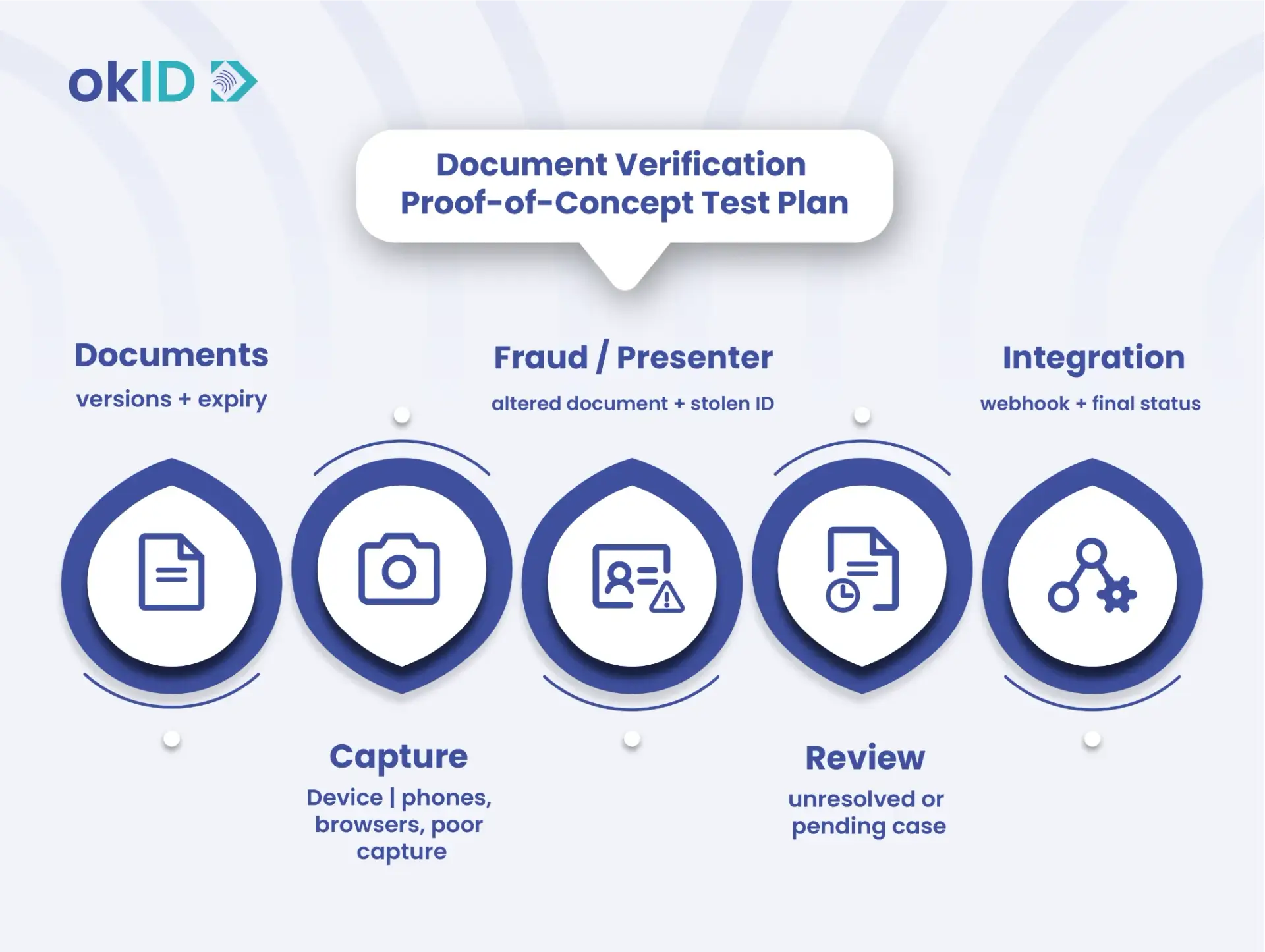
A proof of concept is most useful when it resembles the live onboarding flow. The same source documents should be used across vendors instead of letting each supplier choose its easiest demo cases.
- The sample set should come from genuine onboarding volume. It should include the passport and ID versions customers actually submit, along with the expiry states that create recurring exceptions. Record the expected result for each sample before the run.
- The same sample should also be run on the phones and browsers that customers use. Low light, glare, or desktop-to-mobile handoff only belong in the test if those conditions occur in the live journey.
- Authorized altered documents and stolen genuine IDs test a different risk from poor capture, so their document and presenter results should be recorded separately.
- Follow one unresolved case from the message shown to the customer through any pending state, analyst review, and final disposition. Record who owns the case at each point.
- For an integrated deployment, delay or repeat a webhook and check that it still reconciles to the correct verification ID without creating a second decision. Validate the final status server-side.
- Build the commercial model from the retries and review cases that occurred during the trial. Retention settings and deletion ownership can then be recorded alongside the cost assumptions.
Which Platform Fits Your Document Risk Model?
Retries, manual review, and delayed backend decisions all create work after the document has been submitted. The best document verification software for an onboarding flow is the platform whose handling of those cases fits the team’s review ownership and integration setup.
With okID, the document check can run first inside the identity verification software flow. Face matching, liveness, or NFC can be added only where the onboarding policy calls for them, and the verification result is returned through the configured integration.
FAQs About The Best Document Verification Software
1- What is the best document verification software for a mobile-first onboarding flow?
A good mobile-first platform supports the phones customers use, including any mobile-only step the journey requires. Test that fits with the ID types and devices used in production, including desktop-to-mobile handoff or NFC where relevant.
2- Can document verification run without a selfie?
Yes. A workflow can stop at the document check. If the business also needs to confirm that the customer is the person shown on the ID, it needs a separate presenter check.
3- Can a business add ID checks without building its own capture interface?
Yes. A hosted or embedded flow can handle the capture screens without the business building its own camera and upload interface. SDKs and APIs give engineers more control when the flow needs it.
4- Are retries and failed checks billed again?
Sometimes. The contract decides what creates a charge. Take one failed attempt and one manual-review case from the proof of concept and map each one to the vendor’s billing terms.
5- Does NFC verification always require a mobile SDK?
For the providers covered here, yes, their documented NFC routes use mobile SDKs. Sumsub says NFC is MobileSDK-only. Persona says NFC scanning is available only through its mobile SDKs, not the web. Entrust also documents NFC through its mobile SDKs.
If NFC is required, verify the supported integration channel against the phones and electronic IDs used in production before assuming another route is available.